Initial Screen/Navigation: A New Paradigm
Designing the foundational navigation framework for Meditech’s next-generation of products - aligning multiple teams around a shared vision for how users interact with the product.
Context
Meditech, the third-largest hospital Electronic Health Record (EHR) provider, began rebuilding several core applications in 2025, including the Laboratory Information System (LIS) and Imaging.
The effort rethought the product from the ground up—codebase, workflows, interaction patterns, information architecture, and a new design system.
I joined the Laboratory team at the start of this initiative. One of the first cross-department efforts was a collaboration with Imaging to define a shared home page and navigation framework for the new applications—an initiative that became known as the Initial Screen / Navigation Scrum.
Problem
At the beginning of the project, the navigation system had no shared vision or guiding principles.
Several issues quickly surfaced:
Multiple teams began designing their own home pages independently
Developers started implementing solutions without user research
There was no agreement on what a dashboard, workspace, or widget meant
The project timeline required a coded visual to be presented within a month
Because the project started in a chaotic environment, the team spent months debating competing design directions without making progress.
A decision was made to pause development in order to allow designers to perform appropriate user-centered research.
My Role
The team was built with a Laboratory UX Designer, myself, and an Imaging UX Designer.
My responsibilities included:
Conducting user interviews
Synthesizing research into actionable design principles
Defining the conceptual framework of the home page and navigation system
Establishing terminology and documentation used across teams
Collaborating with the Imaging team, developers, product owners, and design system team
Designing low-fidelity prototypes to align stakeholders and all designers on the navigation model
Laboratory users want to perform 70% of their daily tasks from that first screen. These are simple tasks.
For the remaining 30% that are more complex, the user then wants to go dig in to additional screens.
Solutions
I conducted interviews with laboratory professionals to understand how they expected to interact with the system. Instead of focusing on what should appear on the home page, the research focused on how users navigate their work throughout the day.
A clear insight emerged across interviews:
Users want to perform most of their daily work from the initial screen.
This led to a foundational design principle:
Approximately 70% of tasks should be completed directly from the home page, while the remaining 30% should be accessible through deeper workflows.
This principle gave the team a clear decision-making framework and shifted conversations away from individual preferences toward user-centered design.
Establishing Research-Driven Navigation

User interviews at the base of the research
Based on the research, I defined a consistent navigation structure composed of four persistent elements:
Header for global tools such as search and settings
Left navigation menu for accessing major workflows
Center workspace where users perform their primary tasks
Right reference region containing widgets and alerts
This framework created a stable navigation shell that remains consistent across the application while allowing different workflows to appear in the central workspace.
Because Laboratory and Imaging are both rebuilding their applications simultaneously, this structure also served as a shared foundation across teams and for all future MEDITECH applications.
Designing a Shared Navigation Framework

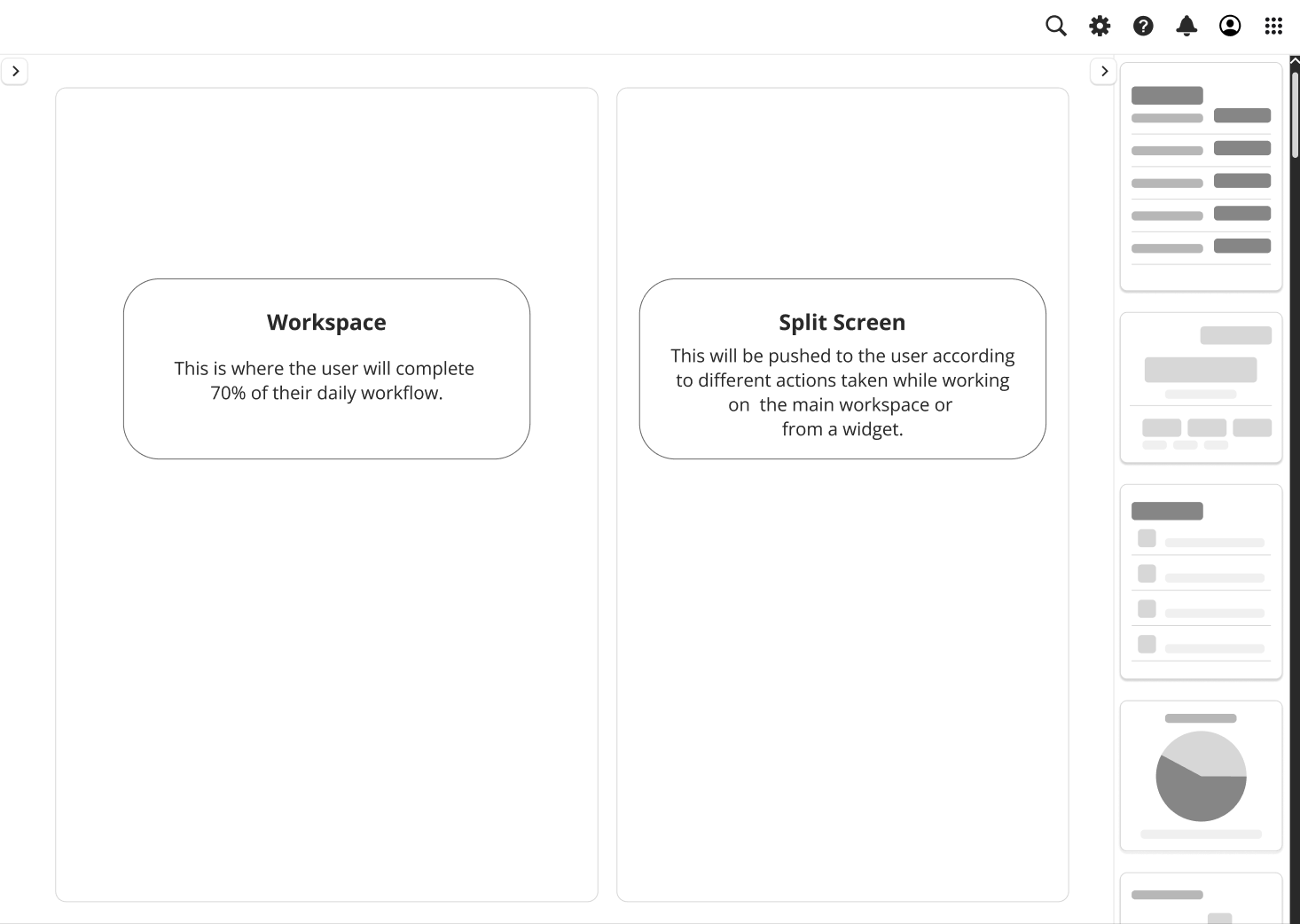
Used a very low fidelity prototype to keep everyone on board and the message consistent - with the team, stakeholders, C-suites
Introducing Workspaces
Research revealed that laboratory professionals rarely complete one task at a time. Instead, they frequently switch contexts as new work arrives.
To support this behavior, we replaced the legacy concept of routines with workspaces—flexible environments where users can begin a task, leave it open, and return to it later.
The user can also open more than one workspace at once, navigating from their initial workspace, but also from a widget or nav menu.
If the user needs a larger workspace they can expand it to take over their whole screen. But everything is present from that initial home page.
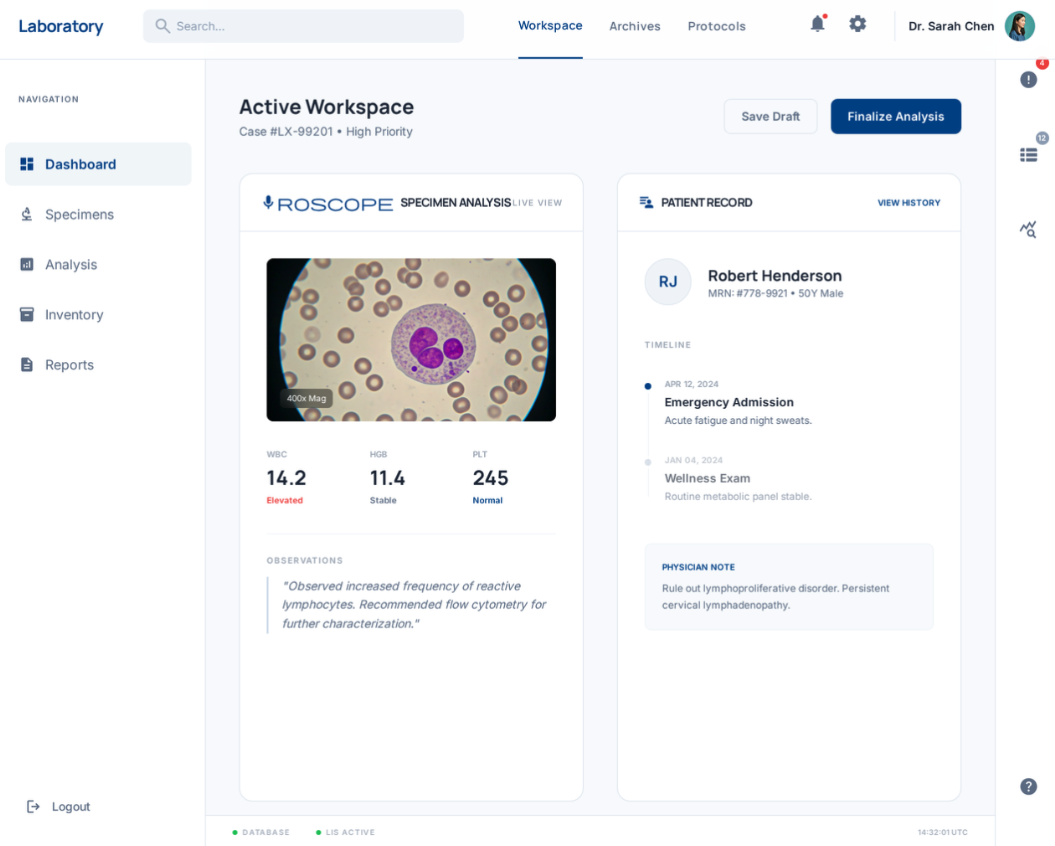
Framework is: workspace, split view, nav menu, bubble widgets
Pain Points
Early project chaos created many competing design directions
Stakeholders across the organization wanted input on foundational decisions
The design system was still being built, limiting available components
Multiple applications needed to align on the same navigation structure
Getting the cross functional teams on board necessitated a lot of conversations and compromises
This project reinforced that in large enterprise environments, UX is often about alignment as much as design.
The biggest challenge was not designing the navigation itself—it was establishing a shared understanding of the problem across dozens of stakeholders.
By grounding discussions in research and clearly defining core concepts, we were able to move conversations away from personal preferences and toward a shared product vision.
Sometimes the most impactful UX work is not designing polished interfaces—it’s establishing the foundational rules that everything else can build upon.